Har1743.github.io
This is my blogging website.
Project maintained by Har1743 Hosted on GitHub Pages — Theme by mattgraham
Bandit Walkthrough (Level 0 - 5)
Today we will play a war-game names BANDIT.
This war-game is hosted by Overthewire organisation.

It is absolutely for beginners.
It is basically teaches the basic knowledge of linux and ssh in a fun challenging way
Objective
- Catch the hints given to you.
- Login to ssh with credentials.
- Enumerate for credentials for the next Level.
Level 0
Level Goal
The goal of this level is for you to log into the game using SSH.
The host to which you need to connect is bandit.labs.overthewire.org,
on port 2220.
The username is bandit0 and the password is bandit0.
Once logged in, go to the Level 1 page to find out how to beat Level 1.
Let’s login to bandit0
ssh -p 2220 bandit0@bandit.labs.overthewire.org
password : bandit0
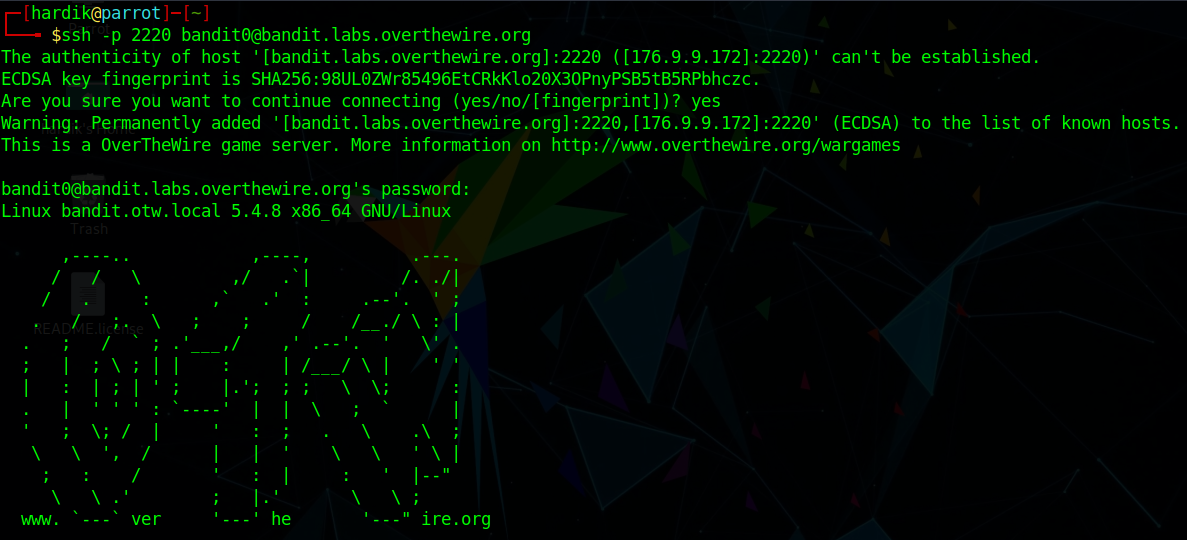
Level 0-1
Level Goal
The password for the next level is stored in a file called readme
located in the home directory.
Use this password to log into bandit1 using SSH.
Whenever you find a password for a level,
use SSH (on port 2220) to log into that level and continue the game.
Commands used
- ls
- cat readme
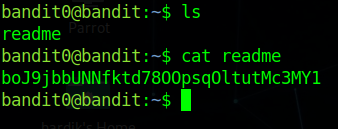
We got the password for next level
username : bandit1
password : boJ9jbbUNNfktd78OOpsqOltutMc3MY1
Level 1-2
Level Goal
The password for the next level is stored in a file
called - located in the home directory
Let’s login to bandit1
ssh -p 2220 bandit1@bandit.labs.overthewire.org
password : boJ9jbbUNNfktd78OOpsqOltutMc3MY1
Now we are login to bandit1
We have found the - file but we can’t read this file by cat -
as cat takes -(hypen) as stdin/stout.
So we have to prefix it by using ./-
Commands used
- ls
- cat ./-
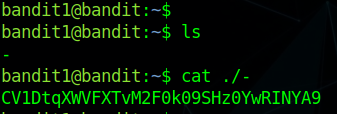
We got the password for next level
username : bandit2
password : CV1DtqXWVFXTvM2F0k09SHz0YwRINYA9
Level 2-3
Level Goal
The password for the next level is stored in a file
called spaces in this filename located in the home directory
Let’s login to bandit2
ssh -p 2220 bandit2@bandit.labs.overthewire.org
password : CV1DtqXWVFXTvM2F0k09SHz0YwRINYA9
Now we are login to bandit2
We have to open the file called spaces in this filename
But we can’t read this file normally with cat command
As cat command reads filename until the space as it considers space as null.
So we have to use “” so that cat ignores the space between the filename.
Commands used
- ls
- cat “spaces in this filename”

We got the password for next level
username : bandit3
password : UmHadQclWmgdLOKQ3YNgjWxGoRMb5luK
Level 3-4
Level Goal
The password for the next level is stored in a hidden file
in the inhere directory.
Let’s login to bandit3
ssh -p 2220 bandit3@bandit.labs.overthewire.org
password : UmHadQclWmgdLOKQ3YNgjWxGoRMb5luK
Now we are login to bandit3
let’s enumerate to inhere directory
As by doing normal ls we are not able to see the file
So we do ls -al to show the hidden file
Commands used
- ls
- cd inhere
- ls -al
- cat .hidden
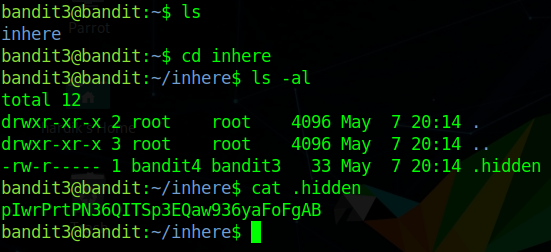
We got the password for next level
username : bandit4
password : pIwrPrtPN36QITSp3EQaw936yaFoFgAB
Level 4-5
Level Goal
The password for the next level is stored in the only human-readable file
in the inhere directory.
Tip: if your terminal is messed up, try the “reset” command.
Let’s login to bandit4
ssh -p 2220 bandit4@bandit.labs.overthewire.org
password : pIwrPrtPN36QITSp3EQaw936yaFoFgAB
Now we are login to bandit4
let’s enumerate to inhere directory
Here we found there are many files but we dont’t know which file is human readable
So we can find usind file command file ./* - this cmd checks for the type of file.
Commands used
- ls
- cd inhere
- ls
- file ./*
- cat ./-file07
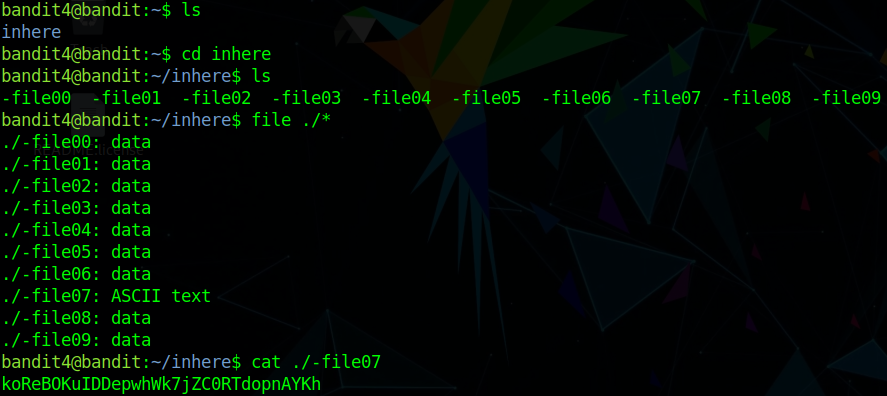
We got the password for next level
username : bandit5
password : koReBOKuIDDepwhWk7jZC0RTdopnAYKh
Level 5-6
Level Goal
The password for the next level is stored in a file
somewhere under the inhere directory
and has all of the following properties:
human-readable
1033 bytes in size
not executable
Let’s login to bandit5
ssh -p 2220 bandit5@bandit.labs.overthewire.org
password : koReBOKuIDDepwhWk7jZC0RTdopnAYKh
Now we are login to bandit5
So let’s enumerate in inhere directory
we have found a bunch of directories in inhere
so we have to find our file having 1033 bytes in size
using find command as find . -size 1033c (c is for bytes).
Commands used
- ls
- cd inhere
- ls
- find . -size 1033c
- cat ./maybehere07/.file2

We got the password for next level
username : bandit6
password : DXjZPULLxYr17uwoI01bNLQbtFemEgo7
Author : Hardik Chugh